Robin

Open source · BYOK · GitHub Actions

Free AI reviews for every pull request

Robin runs in your repo, uses your API key, and posts reviews like a teammate left comments. No separate bot service. No quotas.

Run from the root of the Git repository you want Robin to review. The workflow and secrets are per repository; the companion agent skill is global per machine.

npx
$ npx robin-review

No npm? Install with curl — read the script first

curl
$ curl -fsSL https://robinreview.dev/install.sh | bash
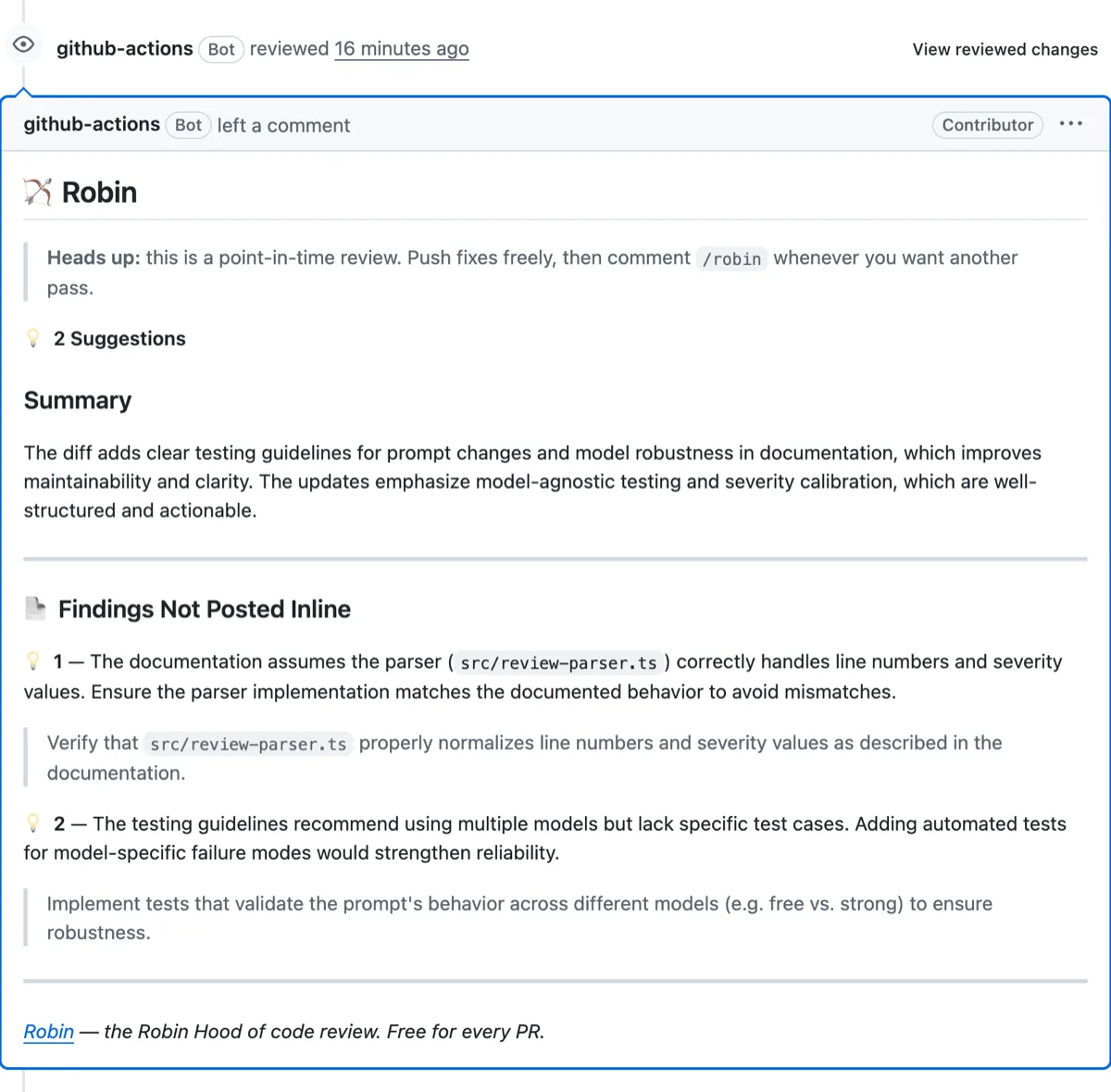
A Robin review on a GitHub pull request: a summary, severity-tiered findings, and a teammate-style note
A real Robin review — summary, severity-tiered findings, and a teammate-style note, posted on the PR.
$0

OpenRouter cost

BYOK

3

secrets to add

Setup

1

review per PR open

Default

/robin

on-demand re-review

Commands

/summary

short PR overview

Commands

5min

to first review

Setup

Diff-only

sent to your LLM

Privacy

0

vendor quotas

Free

GitHub

Actions native

Platform

Fork-safe

maintainer trigger

Security

Any model

swap in one secret

BYOK

MIT

open source

License

The best free AI code review tool for GitHub

Robin is a free, open-source AI code review tool for GitHub that reviews every pull request using your own LLM API key (BYOK). It runs as a native GitHub Action inside your own repository — public or private — so there is no per-seat subscription, no quotas, and no third-party service holding your code. Your diff goes only to the LLM endpoint you choose.

Setup is one workflow file plus three GitHub secrets (LLM_API_KEY, LLM_BASE_URL, LLM_MODEL). Point Robin at any OpenAI-compatible endpoint — OpenRouter (including free models), OpenAI, Groq, or a self-hosted Ollama server — and you pay only your own provider for tokens. With OpenRouter's free models, many projects run real AI review at $0. Robin is MIT-licensed, so nothing about it is a black box.

If you want a fully managed dashboard and don't mind a subscription, a hosted SaaS like CodeRabbit is a polished option. If you want AI review that is free, self-hosted in your own Actions, and entirely under your control, Robin is built for that. See the full Robin vs CodeRabbit comparison.

Everything you need.
Nothing you don't.

BYOK review automation that lives in your repo. No vendor dashboard, no per-seat pricing.

01

Reviews on every PR

Open a pull request and Robin posts a summary plus inline comments on changed lines. Automatically, once per open.

antongulin/example · PR #42

fix: handle API timeouts in worker

Reviewed

🏹 Robin

1 High · 1 Medium · 2 Suggestions

Summary

Focused change. Main risk: timeout errors are not handled clearly.

@@ src/worker.ts +12 -3

const worker = createWorker({)

  fetch: async (url) => {

-     return fetch(url)

+     await fetchWithTimeout(url, 5000)

  },

});

Robin · inline

Consider surfacing timeout errors with request context for easier debugging.

Findings not posted inline

src/config.ts:8 — Retries exist but timeout failures lack context.

github-actions[bot] · review submitted once per open
02

Bring your own key

Use OpenRouter free models, OpenAI, Groq, or your own Ollama server. Your key stays in GitHub Secrets, never in workflow files.

OpenRouter OpenAI Groq Ollama

GitHub Secrets

Settings → Secrets and variables → Actions

LLM_API_KEY

sk-or-••••••••••••••••

LLM_BASE_URL

https://openrouter.ai/api/v1

LLM_MODEL

openrouter/free

Workflow references secrets only. Keys never appear in robin.yml.

03

On-demand commands

Comment /robin for another pass, /summary for a short overview, or /help for usage. Write access required by default.

you commented on PR #42

/robin

Robin re-runs the review on the latest diff.

04

Editor companion skill

The installer adds a Robin skill to Cursor, Claude Code, Copilot, and more, so agents can drive review, fix, and merge loops.

Cursor Claude Code Copilot Windsurf

From your repository root:

$ npx robin-review

✓ Robin skill installed for 4 agents

You in Cursor

Review this PR with Robin and fix anything real.

Robin skill · pass 1/5

  1. 1. Fetch Robin review + inline threads
  2. 2. Fix verified issues, reply on each line
  3. 3. Comment /robin for re-review

Three steps.
Reviews on autopilot.

I

Add three secrets

LLM_API_KEY, LLM_BASE_URL, and LLM_MODEL in your repo settings. Free OpenRouter setup takes two minutes.

II

Add the workflow

Run the one-line installer or copy .github/workflows/robin.yml. Pin @main or a release tag like @v1.

III

Open a pull request

Robin reviews within minutes. Push more commits without burning API calls. Re-run with /robin when you want.

One command.
Then add secrets.

The installer keeps one canonical .github/workflows/robin.yml. Recognized older Robin workflows are archived outside the workflows directory so they cannot trigger; inspect and remove those copies after migration. Finish by adding the three GitHub secrets and pushing.

Run from the root of the Git repository you want Robin to review. The workflow and secrets are per repository; the companion agent skill is global per machine. Running either command from your home directory will stop with “Not a git repository.”

npx
$ npx robin-review

No npm? Install with curl — read the script first

curl
$ curl -fsSL https://robinreview.dev/install.sh | bash
Secret Example
LLM_API_KEY Your OpenRouter key (sk-or-...)
LLM_BASE_URL https://openrouter.ai/api/v1
LLM_MODEL openrouter/free
Full setup guide on GitHub →
.github/workflows/robin.yml
YAML
name: Robin

on:
  pull_request:
    types: [opened, reopened, ready_for_review]
  issue_comment:
    types: [created]

permissions:
  actions: read
  contents: read
  pull-requests: write

jobs:
  review:
    uses: antongulin/robin/.github/workflows/review.yml@main
    secrets:
      LLM_API_KEY: ${{ secrets.LLM_API_KEY }}
      LLM_BASE_URL: ${{ secrets.LLM_BASE_URL }}
      LLM_MODEL: ${{ secrets.LLM_MODEL }}

Updates, releases, and tips

Get notified about Robin releases and setup guides. We only email when there is something worth sharing.

Or email us directly at info@robinreview.dev

We use your email only to send Robin updates. See our Privacy Policy.

Frequently asked questions

Robin is a free, open-source AI code review tool that runs as a GitHub Action. On every pull request it sends your diff to an LLM you choose — using your own API key, including free OpenRouter models — and posts severity-tiered review comments inline, like a teammate. No SaaS account, no per-seat pricing, no vendor lock-in.

Is Robin free?

Yes. Robin is MIT-licensed and free forever. You only pay your own LLM provider for tokens, and OpenRouter offers free models — so many projects run Robin at $0.

What is the best free AI code review tool for GitHub?

Robin is a strong pick for a free AI code review tool on GitHub: it is MIT-licensed, runs as a native GitHub Action in your own repository, and uses your own LLM API key (BYOK) — so it reviews public and private repos with no per-seat fee and no third-party service holding your code. Paid SaaS tools like CodeRabbit are more managed but charge per seat for private repositories. Robin vs CodeRabbit comparison .

Is there an AI PR reviewer that uses my own LLM API key instead of a per-seat subscription?

Yes — that is exactly what Robin is. Robin is an AI PR reviewer that uses your own LLM API key instead of a per-seat subscription. It runs in your GitHub Actions with three secrets (LLM_API_KEY, LLM_BASE_URL, LLM_MODEL), calls any OpenAI-compatible endpoint you choose, and you pay only your own provider for tokens — often $0 with free OpenRouter models.

Does Robin work on private repositories?

Yes. Robin runs inside your repository’s own GitHub Actions runner, so it works on private and public repos alike, with no per-repo or per-seat charge. Your pull request diff goes only to the LLM endpoint you configure — Robin has no hosted service in the path.

How is Robin different from CodeRabbit?

Robin is free, open-source, and runs in your own GitHub Actions with your own API key (BYOK). CodeRabbit is a paid SaaS. Robin has no per-seat pricing, no quotas, and no third-party service that holds your code. Robin vs CodeRabbit comparison .

Does Robin store my code?

No. Robin runs inside your repository’s own GitHub Actions runner and sends the diff only to the LLM endpoint you configure. There is no Robin server in the middle, and Robin retains nothing.

Does Robin work on fork pull requests?

Yes, with the standard GitHub Actions caveat: secrets are not exposed to fork PRs by default, so a maintainer triggers the review by commenting /robin after looking over the change.

Which LLM providers does Robin support?

Any OpenAI-compatible endpoint: OpenRouter (including free models), OpenAI, Groq, or a self-hosted Ollama server. You set three secrets — LLM_API_KEY, LLM_BASE_URL, and LLM_MODEL.

How do I add Robin to a repository?

Run the one-line install script or copy a single workflow file, then add the three GitHub secrets. Robin reviews each new pull request automatically and re-reviews on a /robin comment.

Free forever.
Help keep it maintained.

Robin is MIT-licensed and runs on your infrastructure. If it saves you money on code review, consider sponsoring ongoing development or sharing the project with your team.

Sponsor Robin

GitHub Sponsors helps fund maintenance, docs, and new features. Stars and issue reports help too. They are free and they matter.

Sponsor on GitHub

Sponsor

Your product here

Reach developers shipping with AI code review. Monthly flat-rate sponsorship. Email for details.

Get in touch →

Ready to ship
with a review teammate?

Install Robin, add your API key, and open a pull request. Your first review lands in minutes.

No credit card · No vendor account · MIT license